AI coding agents have moved well beyond autocomplete in the past year, and the more they can do, the harder they are to tell apart. Every agent demos well. What separates them shows up later: how much of your time goes into reviewing what they hand back, how they behave in an editor versus a terminal, and whether the models your team has approved run on the agent you pick.
This guide compares eight agents you can use today. Each is evaluated against the same criteria, including JetBrains Junie: what it's best for, its key strengths, its trade-offs, and who should choose it. There's no ranking and no universal winner. You should finish with two or three worth trialing on your own repository.
What developers care about most in an AI coding agent
The JetBrains Developer Ecosystem Survey 2026 asked developers what they check when reviewing agent-generated code. Functional correctness and code quality come first. Code style comes last. Key takeaway: Formatting gets forgiven; wrong code does not.
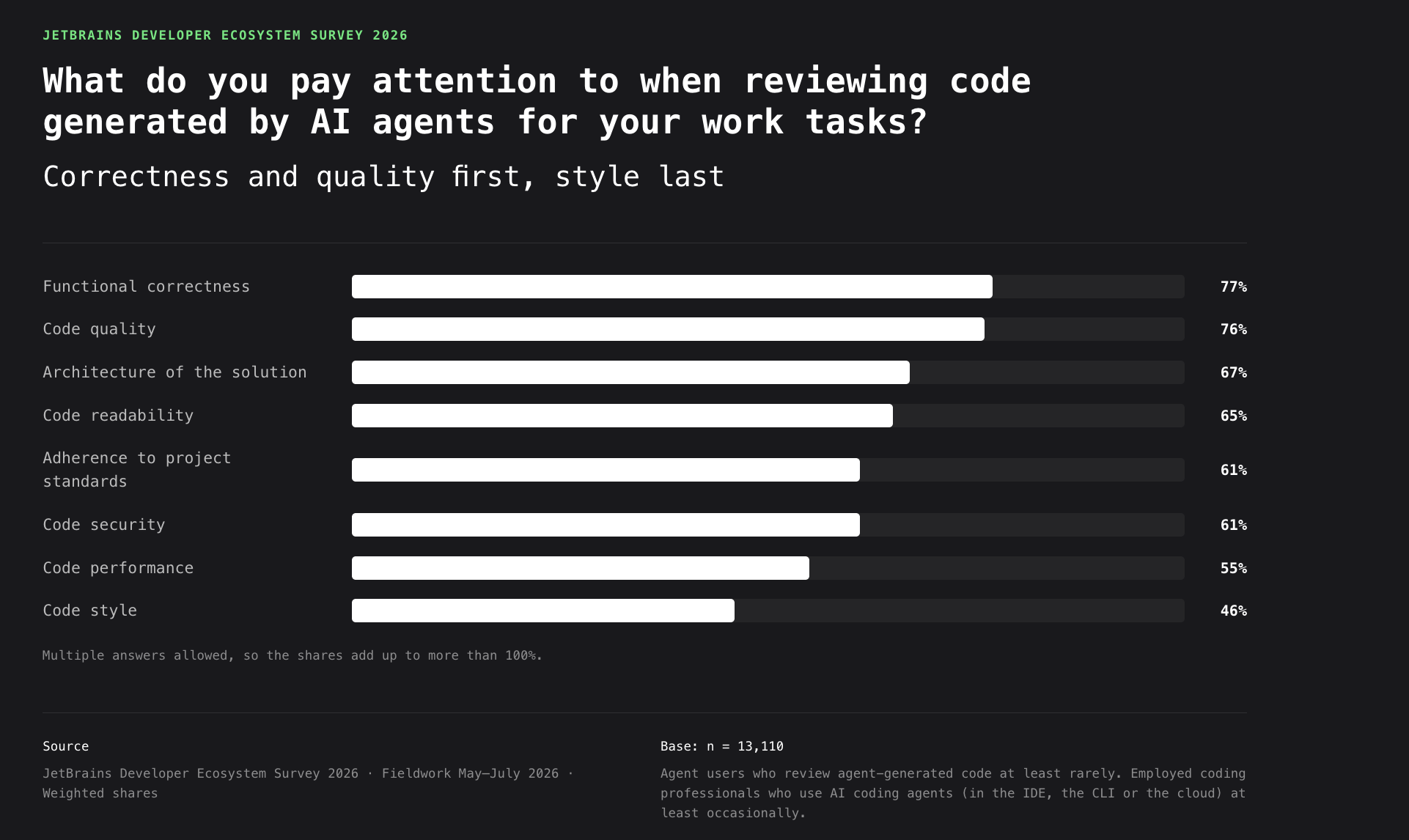
That sets the bar an agent must clear, which is why every profile below answers the same four questions. Five criteria decide those answers.
- Output you can trust. Correct, well structured, and solving the problem you meant rather than an adjacent one that was easier to answer. No agent clears this everywhere.
- Codebase awareness. An agent that has to rediscover the project on every task spends time exploring rather than solving the problem. Tools address this differently: by reading files on demand, using IDE project intelligence, or querying a repository index.
- Where it runs. Review happens in the editor by a wide margin: 69% of developers who review agent-generated code do it in an IDE or code editor. An agent that runs where you already review keeps the diff, the tests, and the fix in one place.
- Security and governance. Where an agent executes, what it can reach, whether its actions leave an audit trail, and whether the models your team has approved run on it. A tool without answers won't clear procurement, however good its output.
- Supervision cost. Reviewing an AI-generated pull request usually requires more effort than reviewing a colleague's work at the same seniority: 42% say more, compared with 30% who say less, a net of +12 percentage points. No per-tool figure exists, so this is one to measure on your own workflow.
AI coding agents at a glance
Every claim here reflects the status of each tool as of September 2026. Enterprise-ready means the product offers an organizational or enterprise deployment path with centralized administration and access controls. It does not mean every feature or interface is available on that tier.
| Agent | Best for | Interface | Open source | Enterprise-ready |
|---|---|---|---|---|
| Claude Code | Long-running multistep tasks, large refactors | CLI, IDE extensions, desktop app, web | No | Yes (Anthropic) |
| OpenAI Codex | Multistep coding work, flexible deployment options | CLI, IDE extension, cloud, ChatGPT desktop app | Partial (CLI, SDK) | Yes (OpenAI) |
| Google Antigravity | Agent work you can review as artifacts | Desktop app, IDE, CLI | No | Yes (Gemini Enterprise; not the IDE) |
| Cursor | IDE-first development, team-wide agent conventions | IDE, CLI, web app, cloud agents, Slack, ACP clients (Neovim) | No | Yes |
| GitHub Copilot | IDE and PR workflows, mixed-editor teams | IDE extensions, CLI, GitHub website, cloud agent | No | Yes (GitHub Enterprise) |
| JetBrains Junie | IDE-native agentic workflows | JetBrains IDEs, CLI, ACP clients | No | Yes |
| Cline | Model-agnostic agentic tasks across editors | IDE extensions (VS Code, JetBrains, Cursor), CLI, Kanban app, ACP clients (Zed, Neovim) | Yes (Apache 2.0) | Yes |
| Devin Desktop (formerly Windsurf) | Running and reviewing several agents from one surface | IDE with a built-in manager for local and cloud agents | No | Yes |
That is enough to rule out a few options. Ruling one in means looking at the following information.
Best AI coding agents for developers
There's no universally best AI coding agent. Each tool is designed for different development workflows. The sections below use the same structure for every tool, so you can compare them directly.
Claude Code
Claude Code is Anthropic's coding agent, and the shape it serves best is work that outlasts a single prompt: long multistep tasks, sustained investigations, and sessions that keep running after the terminal closes. The agent and models come from one vendor, which cuts both ways below.
Best for
- Large, multifile refactors run within the permissions you grant.
- Complex bug investigations that need sustained reasoning.
Key strengths
- Work that survives the terminal: Recurring
/looptasks, a morning code review, or a weekly dependency audit carry over to a background session that keeps running without a terminal, and a supervisor restarts a session whose process exits unexpectedly. Tasks fire only while a session is running and idle. - Symbol-level code intelligence: Plugins connect the agent to a language server for definitions, references, and post-edit type errors, so it resolves symbols rather than scanning the file tree.
Trade-offs
- Context still runs out on a large repository: Opus 5's 1M-token window pushes the ceiling higher, though availability varies by plan, and a large codebase can still exceed what one session holds.
- Claude models only: You can change the provider to Amazon Bedrock, Google Cloud, or Microsoft Foundry, but not the model family, so an approved-provider policy that rules out Anthropic rules out the tool.
Who should choose it?
Developers who want explicit control over what an agent touches, and teams already invested in Anthropic's models.
OpenAI Codex
Codex is OpenAI's coding agent. The models stay OpenAI's, but where they run is negotiable: OpenAI's cloud, Amazon Bedrock, or a local runtime on your own machine, with an open-source CLI and SDK as the client. The features you get depend on your ChatGPT plan.
Best for
- Day-to-day multistep coding work, in the terminal or delegated to the cloud.
- Non-interactive runs in CI and scripts, where
codex execputs the same agent in a pipeline.
Key strengths
- You choose where the models run: Amazon Bedrock, a local runtime via
--osswith Ollama or LM Studio, or a custom provider defined by base URL and wire API. The models stay OpenAI's throughout. What changes is the network path and who authenticates, which is usually what an approved-provider policy is asking about. - The client is open: OpenAI published the CLI and SDK openly on GitHub, so a license review can read what you install rather than take it on trust.
Trade-offs
- The model lineup moves under you: OpenAI retires and replaces Codex models on its own schedule, so pinning a specific model is a maintenance commitment rather than a one-time decision.
- Coverage varies by surface: OpenAI publishes a per-feature availability matrix for the Bedrock path, and JetBrains IDEs reach Codex through the IDE's own AI chat rather than an OpenAI-built extension.
Who should choose it?
Developers who want a general-purpose agent whose client they can inspect, and teams that need the models served from infrastructure they have approved, including a local runtime.
Google Antigravity
Antigravity is Google's coding agent and the successor to Gemini CLI. Its defining habit is documentation: Agent work produces plans, walkthroughs, and playback recordings, a written record of what the agent did and why.
Best for
- Delegated tasks you review from the artifacts the agent writes, rather than watching live.
- Work a browser can verify: UI testing and dashboard reads, driven and recorded by the browser subagent.
Key strengths
- The agent writes down what it did: Planning mode produces artifacts: task lists, implementation plans, and walkthroughs that summarize what changed, all readable from both Antigravity 2.0 and the CLI. It is a way to catch up on a task you did not watch happen.
- Enterprise runs inside your own Google Cloud: Sessions use models hosted in your organization's Google Cloud project, under its security controls and data residency guarantees, through either Agent Platform billing or a Gemini Enterprise license.
Trade-offs
- The IDE is not the enterprise surface: Google's documentation states the Antigravity IDE is not supported for enterprise customers and points them to Antigravity 2.0 or the CLI, so the surface you evaluate may not be the one you are allowed to deploy.
- Enterprise narrows the model list: Claude Sonnet 4.6 and Claude Opus 4.6 are available on the consumer plans but unavailable on Enterprise, leaving Gemini models only for the tier most likely to have a model policy.
Who should choose it?
Teams and organizations already standardized on Google Cloud, where the agent inherits the IAM roles, billing, and data residency you have already set up, and Gemini CLI users who need a supported path forward.
Cursor
Cursor is one agent with two front ends: an editor built on the VS Code codebase, and a CLI that runs the same agent in a terminal or a CI pipeline. The agent works from an index of your codebase that Cursor builds automatically as files change, and searches by both meaning and keyword.
Best for
- Teams standardizing how everyone works with an agent.
- Automated pull-request review inside the same tool.
Key strengths
- Team conventions ship as artifacts: Admins distribute plugins, skills, and shared MCP servers through a private marketplace imported from GitHub. Teams plans get one marketplace, Enterprise plans enjoy unlimited ones.
- Review is automated at the pull request: Bugbot reviews every pull request and posts bugs, security issues, and quality problems as inline comments, each carrying a Fix in Cursor or Fix in Web control that hands the repair back to an agent. You can also trigger it by commenting
cursor review.
Trade-offs
- Standardizing on it means also choosing an editor: The agent's tightest surface is Cursor's own editor, so a team that wants everyone on the same footing is also choosing an editor and not only an agent.
- Azure DevOps is a Beta solution, not a parity path: The integration is in public Beta and covers Azure DevOps Services only. Bugbot has limited availability, and automations, Bugbot autofix, and security agents do not work at all.
Who should choose it?
Teams willing to standardize on Cursor's editor in exchange for shared agent conventions and pull-request review in one tool. This is less of a good fit if your repositories live on Azure DevOps, or your developers are spread across editors you do not intend to consolidate.
GitHub Copilot
GitHub Copilot began as inline completion and is now GitHub's own coding agent, one you assign issues to and request reviews from. The product's center of gravity is the platform: Pull requests are where its work arrives, and GitHub now hosts rival agents and models alongside its own.
Best for
- Work that starts as a GitHub issue and comes back as a pull request.
- Code review, requested on any pull request, the way you would request it from a colleague.
Key strengths
- The agent is an assignee, not a panel: Assigning an issue always creates a pull request, while starting from a prompt works on a branch you can review and steer first. Either way, Copilot requests your review when it finishes and iterates on your comments.
- GitHub hosts rival agents and rival models: Anthropic Claude and OpenAI Codex run as third-party agents on the platform, Agentic Workflows name the engine per workflow across Copilot, Claude, Codex, and Gemini, and the cloud agent's model list spans Claude Opus 5, Gemini 3.6 Flash, GPT-5.6, Grok 4.5, and Microsoft's MAI-Code-1-Flash.
Trade-offs
- Capabilities differ by surface: Agent mode, custom agents, and the CLI are not uniformly available everywhere Copilot runs. Custom agents are still in public preview on JetBrains IDEs, Eclipse, and Xcode, so the surface your team actually uses is the one to check.
- Governance is per agent, not per platform: Third-party agents are administered separately, and each Agentic Workflows engine needs its own authentication secret, so restricting Copilot's cloud agent does not restrict Claude or Codex on the same repositories.
Who should choose it?
Engineering teams with mixed editor preferences, GitHub-centric workflows, and organizations that want agent work to arrive as pull requests rather than as local edits.
JetBrains Junie
Junie is JetBrains' own coding agent, available in JetBrains IDEs, as a CLI, and through Agent Client Protocol (ACP) integrations with compatible editors and IDEs. Its distinguishing trait is the cost of running a task: JetBrains tunes the harness around the model rather than reaching for a larger one, and now there is also Junie Local, a version that runs entirely on your own machine.
Best for
- Developers who want agent work that draws on a JetBrains IDE's own understanding of the project.
- Teams that want model choice across cloud, BYOK, custom, and self-hosted model endpoints without changing the agent workflow.
Key strengths
- The harness is the efficiency, not the model: On SWE-rebench's May – July 2026 cycle, Junie resolved slightly more tasks than other agents in the same run, at about a quarter of the cost per problem.
- IDE-aware workflows: Junie can use a connected JetBrains IDE's project indexes, inspections, and test capabilities to work with project-aware context.
- Local execution: Junie Local runs inference on supported local hardware, keeping prompts, source code, and diffs on the machine. The latest release adds Qwen3.8-3.6-27B-blend, a 27B model tuned for Junie's agent loop.
Trade-offs
- Surface differences: The CLI and in-IDE experiences do not expose exactly the same capabilities, so teams should verify which features are available.
- IDE/local requirements: IDE-aware capabilities require a running JetBrains IDE. Junie Local's standard support currently targets Apple Silicon M5 or newer, while experimental Windows support is available in nightly builds for NVIDIA RTX GPUs based on Ampere or newer architectures with at least 24 GB of VRAM.
Who should choose it?
JetBrains IDE users who want agent work grounded in the IDE's own analysis, and teams that want one agent across editor and terminal.
Cline
Cline is a coding agent whose runtime is an open-source SDK. It ships as an extension for VS Code, JetBrains IDEs, Cursor, and Devin Desktop (formerly Windsurf), and reaches Zed and Neovim over ACP.
Best for
- Model-agnostic agent work, with the model chosen per task or supplied through your own provider key.
- Embedding the same agent runtime in your own tools, from editors to custom applications.
Key strengths
- One harness behind every front end: The open-source SDK is the same runtime as the extensions and the CLI, so a mixed-editor team is not forced to standardize, and you can embed the agent in your own application.
- Enterprise runs on your terms: Cline Enterprise keeps code in your environment and connects to your own inference at your negotiated rates, through Bedrock, Vertex AI, Azure OpenAI, or any OpenAI-compatible endpoint, with single sign-on, role-based access control, and OpenTelemetry export.
Trade-offs
- The open-source core is not the whole product: The SDK and agent core are open, while the hosted API, the ClinePass subscription, and the enterprise tier are commercial, so a license review has to name the component you plan to deploy.
- Capability differs by front end: Agent teams and scheduled agent runs work on the SDK, the CLI, and Kanban, and the documentation states they do not apply to the VS Code and JetBrains extensions.
Who should choose it?
Teams standardizing one agent across different editors, and organizations that need code and inference to stay on their own terms.
Devin Desktop
Devin Desktop is Cognition's IDE and the new name for Windsurf, rebranded on June 2, 2026. Behind the editor sits Cognition's wider Devin platform, and that is where most of what separates it from a VS Code fork actually lives.
Best for
- Developers who keep several agents in flight.
- Teams that want a single surface to dispatch, track, and review agents, with an editor attached.
Key strengths
- It hosts other vendors' agents: Devin Desktop supports the Agent Client Protocol, so ACP-compatible agents run alongside Cognition's own. JetBrains Junie is listed among the examples Cognition documents. It sits on the Pro, Max, and Teams plans, with separate enterprise enablement.
- Execution can stay on your own machines: Outposts runs sessions on your VMs, containers, or Kubernetes clusters, so command execution, file edits, and repository access happen on hardware you operate, while the planning loop runs in Cognition's cloud.
Trade-offs
- Extensions are constrained: Other AI code-complete extensions and proprietary extensions are documented as incompatible, and the extension marketplace is a configurable URL rather than the VS Code Marketplace, so audit your current set before you move.
- Local execution does not make the whole system local: Outposts can keep command execution, file edits, and repository access on infrastructure you control, while the agent's planning and orchestration still depend on Cognition's cloud.
Who should choose it?
Developers who have moved to an agent-first way of working and want an agent manager and the editor in one window, and teams that need agent execution to run on infrastructure they control.
Which AI coding agent fits your workflow?
The table also includes components of JetBrains Air that support agent workflows without being standalone coding agents, including JetBrains Air Context.
| Workflow | Recommended options |
|---|---|
| IDE-first development (JetBrains IDEs) | JetBrains Junie, Cline, GitHub Copilot, plus Claude Code and OpenAI Codex through the AI chat |
| IDE-first development (VS Code and its forks) | Cursor, GitHub Copilot, Cline, Devin Desktop, Claude Code, OpenAI Codex |
| CLI-first / terminal-native development | Claude Code, OpenAI Codex, Google Antigravity, JetBrains Junie, Cline, Cursor |
| Large codebases and repository retrieval | Claude Code (language server plugins), JetBrains Junie (IDE analysis), Cursor (codebase index), plus JetBrains Air Context for repository and organizational context |
| Enterprise teams with governance requirements | All eight offer an organizational or enterprise deployment path. Options for organizations with infrastructure constraints include JetBrains Junie CLI with custom or self-hosted LLM endpoints, Junie Local for packaged local inference, Cline Enterprise, Devin Desktop with Outposts, and Google Antigravity through your Google Cloud project. |
| Open source | Cline (core and SDK), OpenAI Codex (CLI and SDK) |
| Multi-model workflows | Cline, JetBrains Junie, GitHub Copilot, Cursor, Devin Desktop, Google Antigravity (consumer plans) |
| Parallel and async agent execution | Claude Code, OpenAI Codex, Cursor, JetBrains Junie CLI, Cline (Kanban), Google Antigravity, Devin Desktop |
| Review workflows | Agent work arriving for review: GitHub Copilot (pull requests), Google Antigravity (artifacts). Agents reviewing your code: Cursor (Bugbot), GitHub Copilot, JetBrains Junie (GitHub Action, GitLab CI) |
Two patterns cut across the table. A team with mixed editor preferences needs coverage before depth, which favors the agents that run in more than one editor. A team already standardized on one editor can instead optimize for how well the agent uses it. The harder question is usually not whether an agent has governance, but where your code and your inference actually run.
Where AI coding agents fit into modern development
AI coding agents are no longer tied to a single interface. Many now work across IDEs, terminals, cloud environments, and development platforms, so it is more useful to think in terms of working surfaces than fixed categories.
The same agent may appear on more than one surface. What matters is where developers start tasks, provide context, monitor progress, and review the result.
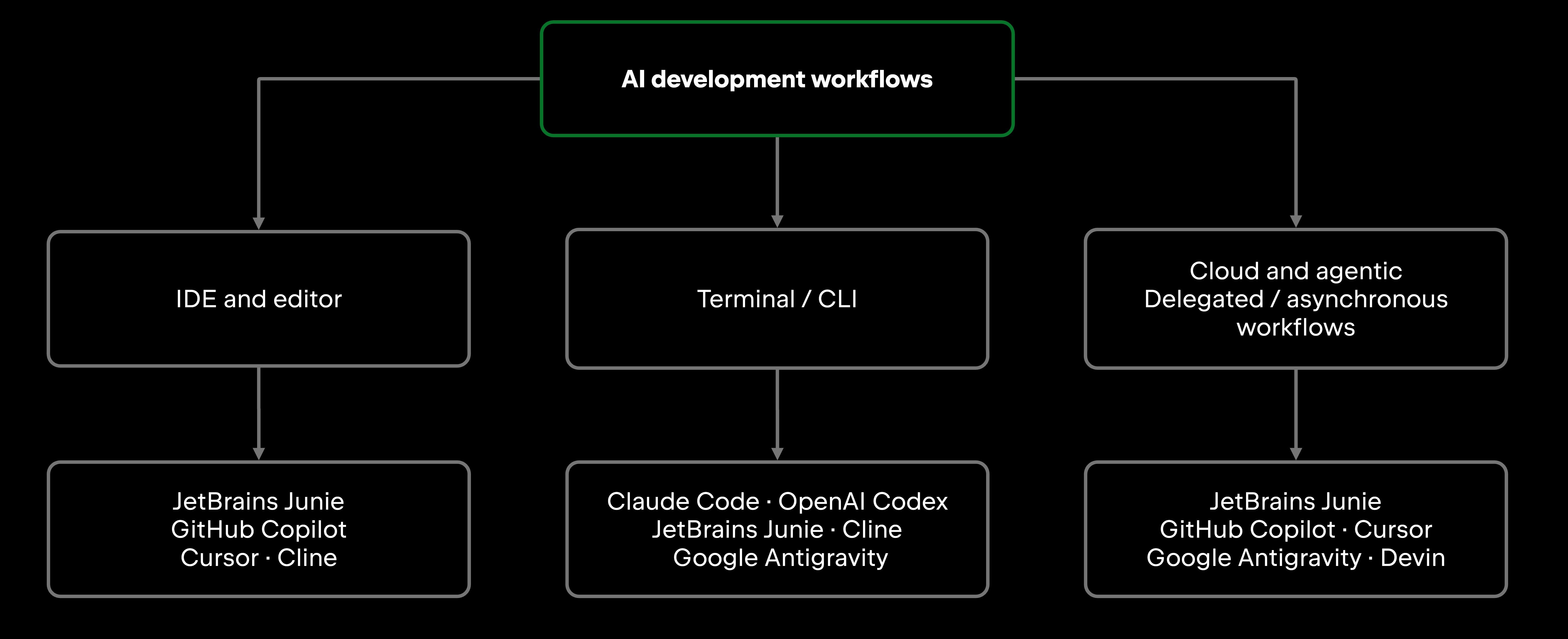
IDE and editor workflows keep agent work close to where developers already understand and review code. Agents can use project context, make changes, run development tools, and return results without forcing developers into a separate working environment.
Terminal and CLI workflows make agents easy to invoke from the shell, scripts, and automation. For some agents, the terminal is only the starting point: longer-running work can continue elsewhere and be reviewed later.
Delegated and asynchronous workflows let developers hand off work and return to the result rather than supervising every step. Depending on the agent, this can include background execution, issue-to-PR workflows, remote execution, or parallel tasks.
These surfaces increasingly overlap. Junie, for example, works across the terminal, JetBrains IDEs, GitHub, and GitLab, while other agents similarly span multiple interfaces. The practical question is therefore not simply which agent runs where, but which combination of agent and working surface best fits the way you develop and review software.
Trends shaping AI coding agents
Repository awareness has become a baseline expectation, so the competition has moved to how far that reach extends, including into repositories nobody has checked out locally. The line between IDE and terminal is blurring with it: Junie CLI borrows a running IDE's project understanding, and Cursor ships the same agent as both an editor and a CLI.
Long-running work has moved beyond a single interactive development session: Claude Code can continue work through cloud surfaces, while Codex can delegate tasks to OpenAI-managed environments. The counter-move is underway: Cline Enterprise, Devin's Outposts, and Antigravity's enterprise tier keep code, inference, or execution on infrastructure you control.
The Model Context Protocol (MCP) has become a common way for coding agents to connect to external tools and services, and it is supported across much of the current agent ecosystem. Connecting a tool is a separate decision from permitting the agent to use it, and that is where they differ: Junie's action allowlist authorizes all MCP tools with a single rule rather than server by server.
As agents become team infrastructure, governance is becoming part of the development platform itself. JetBrains Air Governance brings organization-level AI usage, policy, and cost management into one control layer, covering both JetBrains and third-party agents.
AI-assisted review is becoming part of agent workflows: 42% of developers who review agent-generated code say they use an AI coding agent to help with that review (JetBrains Developer Ecosystem Survey 2026).
FAQs
Which AI coding agent is best for JetBrains IDEs? There is no single best option for every JetBrains IDE workflow. Junie is built specifically for JetBrains IDEs, while Claude Code and OpenAI Codex are also available through IDEs, alongside other supported agent integrations.
How much of AI-generated code do developers typically rewrite? The JetBrains Developer Ecosystem Survey 2026 puts the average at 34%, but the spread matters more: 5% of developers rewrite none of it, 35% rewrite up to a fifth, and 24% between a fifth and two-fifths. Company size has little effect on the figure (33%–36% across teams from the smallest to the largest).
What should I look for when evaluating an AI coding agent for my team? Run the trial with the seniority mix you actually have. Review effort varies by developer experience in the survey: juniors report a tie (+1 percentage point, with a confidence interval that covers zero), compared with +17 percentage points for seniors, so a pilot staffed by one group can misrepresent what the whole team would see. Confirm too that the capability you are buying exists on the surface your team will use.