The hardest question in software maintenance isn't "what does this code do?" It's "what will break if I change it?" Working with legacy code efficiently means closing the gap between what a system does and what your team understands about it, and AI coding agents are becoming a useful way to accelerate that investigation across large codebases.
Developers who have worked in long-lived codebases, such as a 10-year-old e-commerce monolith, a financial processing system that was never fully rewritten, or a Java service that has survived three engineering team turnovers, know the feeling. You understand what a function does. You still won't touch it. Somewhere downstream, something depends on behavior that nobody documented, that only one former engineer truly understood, and that surfaces only when a payment fails during the Black Friday sale.
That uncertainty is what AI coding agents can help reduce. They take on the investigation every legacy change demands: the tracing and reading you would otherwise do by hand, so you can see what a change will affect before you start. They do not replace your judgment, your tests, or your review; they shorten the gap between deciding to make a change and trusting that it is safe. The rest of this article explains how to work that way.
Why legacy code becomes hard to change
The "legacy" label is a little misleading. Legacy code is usually code that has drifted out of reach: The system still runs, but the team's understanding of it has fallen far enough behind that changes become risky. Missing tests and thin documentation widen that distance. And it's that distance, more than the complexity of any single function, that makes engineers reluctant to touch code that already works.
The gap widens in predictable ways:
-
Hidden shared dependencies: A billing module calls a utility function that is also called by the reporting engine, the audit log, and an internal API nobody remembers adding. Change the function's rounding behavior, even correctly, and you may break three things that were never in scope.
-
Missing test coverage: Teams that inherited codebases from a pre-TDD era often face large swaths of business-critical code with no automated coverage. You can't refactor with confidence when you have no way to verify that behavior didn't change.
-
Undocumented business logic: The logic encoding a specific tax calculation for a specific jurisdiction exists only in the code. No ticket, no wiki page, no comment explains why it works the way it does, and the developer who added it left two companies ago.
-
Accumulated conditionals: Quick-fixes compound over the years. An if statement that once handled a single edge case becomes a nest of conditionals handling thirty, with the original intent long buried.
-
No clear ownership: In a repository maintained by several teams over several years, large parts of the codebase have no clear owner. Nobody knows who to ask when something breaks.
The result is a codebase where the cost of any change includes investigation time, validation time, and the standing risk of introducing regressions you won't catch until production.
The real cost of legacy code
The standard framing around legacy code focuses on developer productivity. The more visible cost is the risk aversion that settles into how a team operates: a posture that quietly prioritizes not breaking things over shipping things, and compounds over time.
Consider what that looks like operationally. You pick up a ticket to change how user permissions are evaluated. The implementation might take four hours. But before writing a line, you need to answer: Where is this logic actually defined? What calls it? What are the downstream effects? Are there existing tests, and should there be new ones? Most of that is investigation, not implementation: one measure of how developers actually spend their time puts coding at about 14% of the day, and legacy code is where the investigation around it stretches furthest.
Teams deprioritize feature requests when the testing and validation effort to make a change safely competes with delivery pressure, even when the implementation itself would be straightforward. In legacy maintenance, understanding the impact of a change often takes longer than implementing it, and that is exactly the gap AI agents can narrow.
How AI agents reduce the risk of working with legacy code
AI agents help most by compressing the investigation phase, the reading and tracing you do before you feel safe changing anything. Give an agent access to a large codebase, and it can analyze project structure, traverse references, and surface cross-module relationships far faster than you would working through them by hand. However, how much time that saves depends on the size of the repository, the state of the code, and what you are investigating.
The manual version is tedious and error-prone. You grep for references, follow call chains, read related files, and try to recall whether you have seen a similar pattern elsewhere. You miss things.
Modern IDEs already surface direct call hierarchies and usages through static analysis, and many now layer AI-powered explanations on top of those results. What an agent adds is reasoning across those relationships at repository scale: Ask "what business rule does this function enforce?" or "what could break if I change this field's type?" and you get a synthesized, contextual answer instead of a list of references to interpret yourself.
The capabilities that matter most for legacy work:
-
Dependency tracing: Identifying the callers and callees of a module or function, including indirect dependencies.
-
Impact analysis: Surfacing which files, services, or tests a proposed change could affect.
-
Business logic explanation: Summarizing what a complex block of code does, including why specific conditionals exist.
-
Cross-reference mapping: Finding every place a pattern, class, or variable is used.
-
Side-effect identification: Flagging code that touches shared state, external APIs, or database schemas.
You still make every decision; what changes is how quickly you reach the point where you can make it with confidence.
Understanding change impact before you touch the code
Direct dependencies are the easy part. If calculateDiscount() calls applyTaxRate(), both your IDE and an agent will show you that. The danger lies in the indirect relationships: a utility function that quietly mutates a shared data structure, a service that reads a database field in a way you only notice when you open an unrelated part of the codebase, or a feature flag whose behavior depends on a value you happen to be changing.
Business logic is the part most often underestimated, because it is so often distributed. A single pricing rule might live partly in the API layer, partly in the database schema, partly in reporting queries, and partly in a background job, with no one file tying them together. Seeing the whole rule means reading across all four and recognizing how they interact, which is exactly the kind of repository-wide tracing an agent can carry out across the project context available to it.
How Junie helps developers work with legacy code
Junie is a JetBrains coding agent. This section uses Junie CLI, the terminal interface, because its plan-first workflow lines up with how legacy changes should be approached. Because it reasons over loaded project context, including structure, references, and file relationships, rather than answering isolated prompts, it suits the careful, context-heavy work legacy maintenance demands.
For pure investigation, Plan mode is where legacy work should start. Junie analyzes the codebase with read-only operations and produces a design document for the task before any code is written, covering which files it intends to touch and what it means to change in each. Nothing on disk changes while you are still forming a theory. You review that plan, push back on assumptions, and narrow the scope, and only then let Junie implement it. For legacy work, that review step is the part most workflows have been missing.
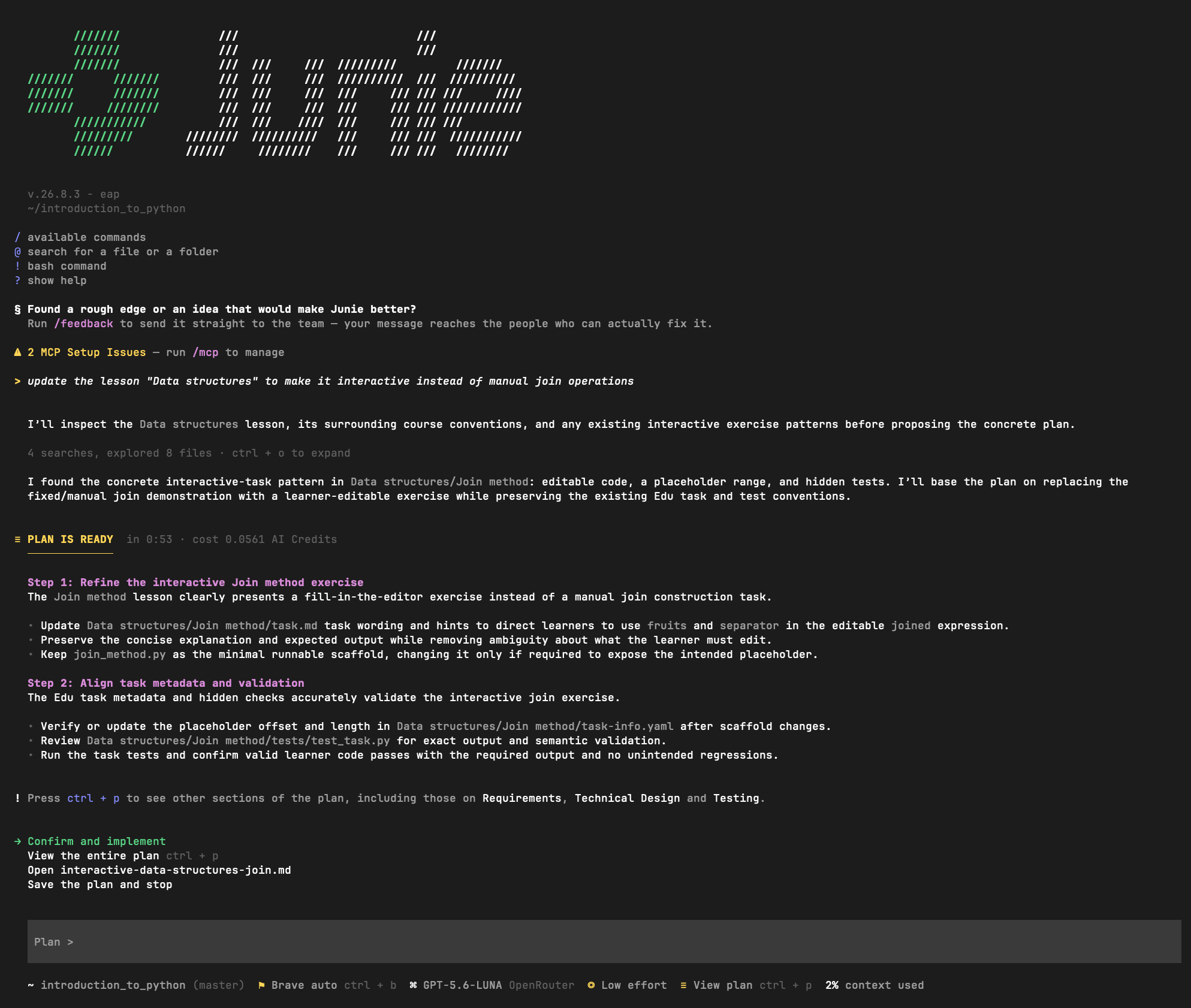
Run from your project directory, Junie CLI works from the repository in front of it rather than from pasted snippets. When the same project is open in a JetBrains IDE, the /ide command connects the session to it, and Junie can then use the IDE's understanding of the project: symbol-aware search, project indexes, and structure-aware analysis. Cross-repository analysis spanning separate services still needs manual coordination.
When a legacy system spans several repositories, an agent that can draw on context across all of them, not just the repo open in your session, keeps the cross-repo dependencies that cause the worst surprises visible.
Example workflow: Safely modifying legacy code
Putting this together, here is what a careful legacy change looks like with an IDE-connected agent. The first stretch is purely investigative, so approve nothing that writes to disk until you are ready to make changes.
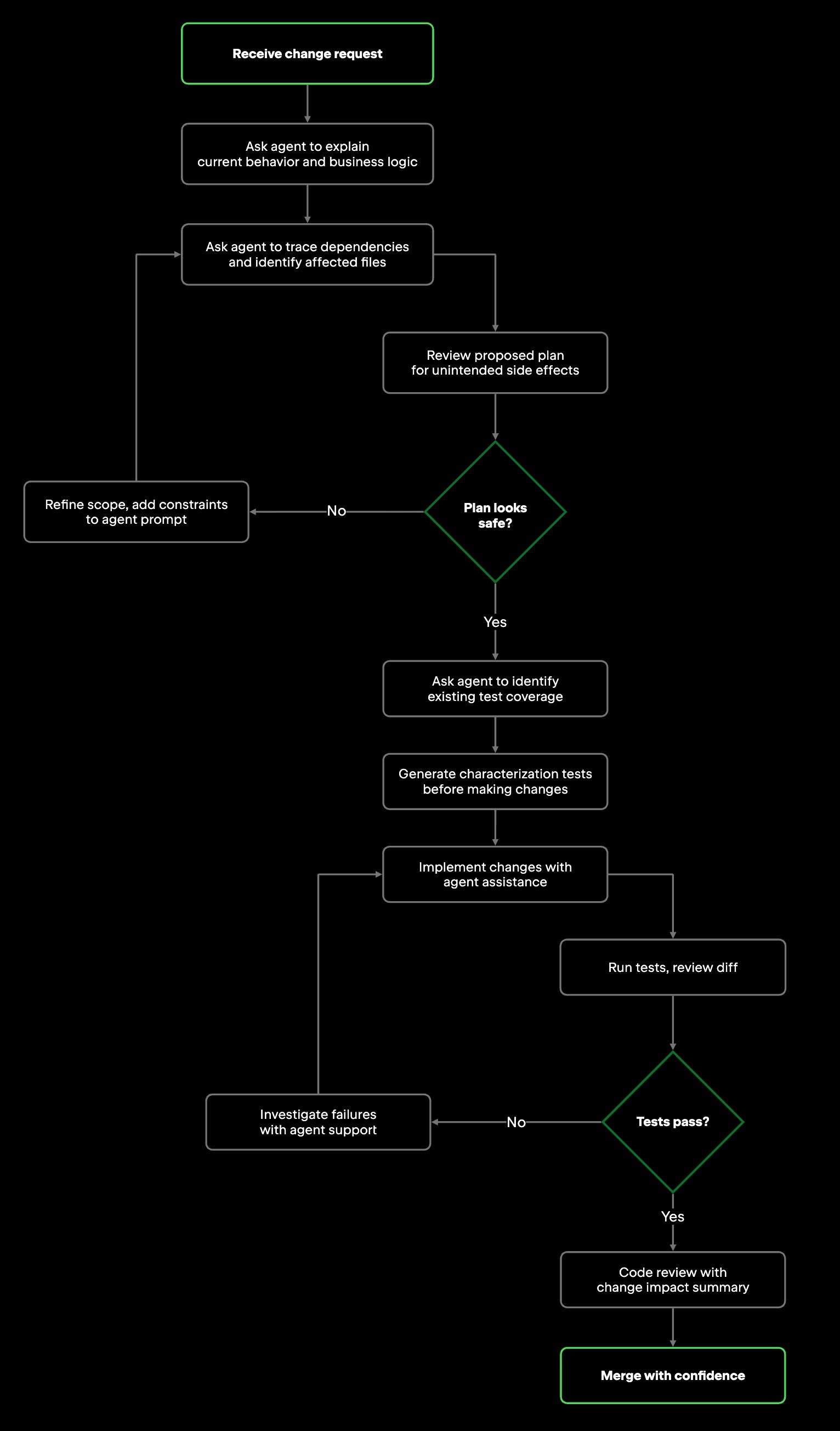
Step 1: Explain current behavior and business logic
Start by asking the agent to explain what the target code does, including the business rule it appears to implement and why specific branches exist. Then verify that explanation against the code itself before you rely on it.
Example prompt:
Explain what calculateDiscount() does, including the business rule each conditional branch enforces and why any edge-case handling exists. Summarize it in plain language.
Step 2: Trace dependencies and affected files
Ask the agent to map everything that calls the code you are changing, everything it calls, and anything that shares state with it. For a well-integrated agent like Junie, this analysis spans the whole project it is connected to, not just the file in front of you.
Example prompt:
List every caller of calculateDiscount(), every function it calls, and any shared state, such as global variables, database tables, or caches, that it reads or writes. Flag indirect callers where you can. Note any uncertainty if indirect relationships cannot be verified.
Step 3: Review the proposed plan
If your agent supports a planning mode, review the proposed changes before any code is written. When the plan touches more files or components than you expected, narrow the scope, keeping in mind that an agent will not always flag scope drift on its own.
Example prompt:
Before changing anything, outline the files you would modify and what you would change in each. Do not write code yet.
Step 4: Address test coverage before writing code
If the code has no tests, add them now so you have a baseline to compare against. Ask the agent to help generate characterization tests that capture current behavior, then review them to confirm they reflect what the code actually does. These tests do not prove the code is correct; they prove your change did not alter its behavior.
Example prompt:
Generate characterization tests for calculateDiscount() that capture its current behavior across the identifiable input cases, including edge cases. Use JUnit 5. Do not change any behavior, only document it.
Step 5: Implement and validate
With the plan approved and characterization tests in place, make the change. If you are using Junie, you can approve the plan and let it execute the steps it proposed, in the order it specified. For a riskier change, having the agent work in an isolated environment, such as a separate Git worktree or a Docker container in JetBrains Air, keeps its edits out of your main working copy until you have reviewed them. Review the diff as each file changes rather than waiting until everything is applied; the plan gives you a checkpoint to verify each edit against. If the agent proposes anything outside the approved plan, push back and narrow the scope before continuing. Then run the tests and read the diff yourself.
Step 6: Summarize the change for reviewers
After the change, ask the agent to summarize what changed and why. That summary helps your own review and gives you a head start on a commit message or PR description that the next developer can actually use.
Example prompt:
Summarize the change I just made to the discount logic: What changed, why, and which behaviors the characterization tests now cover.
Refactoring legacy code with more confidence
Refactoring is where the fear of legacy code bites hardest. By definition, refactoring changes the structure of code without changing its behavior, so any behavioral drift is a bug you just introduced. The safer you want to refactor, the more you need the "before" state to be legible: its edge cases, its implicit assumptions, and the behavior you are committing to preserve.
This is where an agent earns its place. It can help explain behavior, surface edge cases, and generate characterization tests, which removes much of the manual effort of making that "before" state explicit. Use agents to accelerate the investigation and documentation; the target architecture, the refactoring strategy, and the acceptable level of risk stay with you and your team.
Use agents to:
-
Identify refactoring candidates: Areas of high cyclomatic complexity, logic duplicated across modules, or tightly coupled components without clear interface boundaries.
-
Generate characterization tests: Lock in existing behavior before you change it, so regressions surface immediately.
-
Validate scope: Review the proposed changes to see whether the refactoring reaches into parts of the system you did not plan to touch, knowing the agent may not flag every dependency without explicit constraints.
-
Treat output as information: Use the agent's findings to inform your decisions, not to make the decisions for you.
When done well, this keeps the slow, careful investigation fast and the architectural calls human.
Limitations and common pitfalls
AI agents reduce risk in legacy maintenance; they do not remove it. Using them safely is mostly a matter of knowing where they tend to fail and building a verification habit around each weak spot.
Hallucinated explanations are the first failure mode to guard against. An agent can describe what a function does with complete confidence and still be wrong, because it may be synthesizing from patterns rather than verifying the full behavior of your code. Cross-check any business-logic explanation against the actual code path: Trace the function in a debugger or read it yourself rather than trusting the summary.
Context the agent cannot see is the next gap. When your system spans repositories that are not all loaded in the session, the agent analyzes only what is in front of it. Tell it explicitly which repos are out of scope and ask it to flag any cross-repo dependency it cannot verify.
Runtime behavior sits outside static analysis on its own. Environment-specific configuration, database state, message-queue interactions, and timing-dependent behavior do not appear in the code the agent reads. Supplement its analysis with runtime traces, query logs, or feature-flag audit trails before you finalize a plan.
Framework knowledge ages. An agent trained on public data may reach for patterns from an older version of a library you use, so name the framework and version in your prompt, such as "using Spring Boot 3.2", and check any generated pattern against the documentation for that version.
The thread through all four is the same: Treat agent output as the start of an investigation, not its conclusion. Human oversight and judgment stay in the loop throughout.
Final thoughts
Legacy code is hard in large part because of uncertainty: You do not always know what you do not know about the system you are changing, and that uncertainty is what makes a change feel risky. AI agents help reduce it. They can handle much of the slow part up front, then surface a reviewable plan before any code changes are made, so you start from understanding rather than guesswork.
What matters here is repository-level context, not only the surface an agent runs on. An agent that can reason across the loaded project, rather than just the open file, is the difference between smart autocompletion and a tool you can lean on while changing code you do not fully trust. IDE-connected agents get that context by default; other repository-aware agents can access it as well.
You get the most out of this by bringing what the agent cannot: domain knowledge, healthy skepticism, and disciplined testing, while letting it handle the archaeology that used to eat hours. It is the same discipline any agentic workflow needs: Scope what the agent can reach, keep a human on the consequential calls, and let it work inside those bounds. The investigation gets faster; the judgment stays yours.
If you take one practice from this, make it the sequence: Understand the impact before you implement the change. On the next legacy edit that gives you pause, spend the first pass investigating rather than typing, and let the agent carry that investigation. That first pass is where the safety, and most of the time you save, actually comes from.
Frequently asked questions
What makes code "legacy" in the context of software maintenance? Legacy code is often described as code where the gap between what the system does and what the current team understands about it has grown large enough to make changes risky, often with missing tests or thin documentation widening the gap. It is not necessarily old or badly written; team turnover and undocumented behavior can make even well-built code risky to modify.
How do AI agents help with legacy code specifically? They compress the investigation phase, tracing dependencies, mapping cross-module relationships, and explaining business logic across a repository more quickly than manual methods. They also surface indirect relationships, such as shared state mutations, distributed logic, and hidden call chains, that static search tools like grep tend to miss.
What is Junie's Plan mode, and why does it matter for legacy work? In Plan mode, Junie CLI analyzes the code with read-only operations and produces a design document for a change, covering which files will be touched and what is intended, before any code is written. For legacy work, it gives you a checkpoint to catch unintended scope, push back on risky changes, and approve only what you have reviewed. Because the analysis is read-only, you can also run it on code you have no intention of changing yet, purely to understand it.
What are characterization tests, and when should I write them? Characterization tests lock in the existing behavior of code before you modify it. They confirm that your change preserved the code's existing behavior, regardless of whether that behavior was correct to begin with. Write them before any refactoring or modification of untested legacy code; an agent can help generate them from its analysis of current behavior.
Can AI agents replace manual code review in legacy codebases? No. Agents assist the investigation and documentation phases, but they cannot replace your judgment on architecture, risk, or business-logic validation. The strongest workflow pairs agent-assisted analysis with human-owned decisions and test-validated implementation, with experienced developers in the review loop.
What are the biggest failure modes when using AI agents on legacy code? Four are worth watching: hallucinated explanations, where an agent can describe behavior incorrectly with confidence; incomplete repository context, where an agent only analyzes what it can see; missing runtime information, where static analysis can't reason about database state or timing-dependent behavior; and outdated framework knowledge, where an agent may suggest patterns valid for older library versions but wrong for your current stack.
How do I handle legacy code spread across multiple repositories? Make all relevant repositories available in the IDE session before relying on agent analysis. When the system spans repositories that the agent cannot all see at once, treat its dependency analysis as incomplete and verify the cross-repo relationships yourself before making changes.
What's the difference between an IDE-connected AI agent and a general-purpose AI assistant for legacy work? An IDE-connected agent like Junie can ask the IDE for project structure, dependency graph, and file relationships in your workspace, while a general-purpose assistant sees only what you paste into the chat. For legacy maintenance, that difference matters: Project-wide context lets the agent reason about how code fits together and surface the indirect relationships most likely to cause regressions, instead of answering from a single snippet.