IDE-connected AI agents understand your code better because they work inside the development environment and can query the same structural model the IDE maintains: symbol relationships, references, inheritance, and dependencies, rather than only the code you paste in. That grounding lets them reason about how your project actually works.
Generating code has rarely been the hard part; understanding the project it fits into is. Paste a single function into an AI chat tool window, and the model has to assume everything around it: the interface it implements, the configuration it depends on, and the callers that depend on it. Open that same function where the AI can navigate the whole project, and the answer changes, because accuracy comes down to context, not just the model behind it.
This applies to IDE-connected AI agents whether they answer a question or act on a task. The sections below stay at the level of why that context matters, tracing why it outweighs model choice, where prompt-only tools hit their ceiling, and what changes once the AI can query the project the IDE has indexed. Hands-on workflows, such as onboarding and debugging, have dedicated guides of their own.
Why context matters more than model quality
The popular assumption is that AI coding quality is mostly a model problem: pick a better model, get better suggestions. That holds to a point, but incomplete context produces bad advice even from strong models. A capable model working from a single snippet can produce advice that is syntactically correct, idiomatic, and completely wrong for your codebase, because it is reasoning about the fragment you gave it rather than the structure around it. Give a more modest model a way to query the project's real structure, and its advice tends to fit better, because it can see what the fragment leaves out.
Suppose you're chasing a NullPointerException in a Spring Boot service. The stack trace points to a method in OrderProcessor. You paste that method into an AI chat and ask what's wrong. The model spots a possible null dereference and suggests a null check. Plausible. The real cause is a dependency injected via the constructor, defined in a configuration class three files away, that returns null under a specific Spring profile. The model never had that file, so it couldn't reason about it.
This is the norm in modern software. Business logic spans files; behavior depends on class hierarchies several layers deep; and a service that implements an interface inherits contracts that the implementation file never shows. Features route through middleware, validators, and transformers that no single file describes in full.
The problem runs deeper than missing files. Even if you paste five files into a chat session, you've handed the AI a pile of code, not a model of your project. The AI doesn't know which classes are called most often, which module boundaries are load-bearing, or where your team keeps its business validation. A tool wired into the IDE can look up those structural facts directly and infer the conventions from how the code is actually organized.
The limits of prompt-only AI tools
Before turning to what that wiring adds, it helps to be precise about the ceiling prompt-only tools run into. They depend on you to supply context at every turn (pasted snippets, uploaded files, written descriptions), and no amount of model improvement removes that constraint. The snippet you pick may not be where the problem lives, and the tool has no way to find that out on its own.
Most AI coding tools rely on you to provide context somewhere in their design. You paste a snippet or upload a file, describe the problem, and hope your description captures what matters. They remain useful, but the structural limit stays.
The snippet problem is a common example. You select the function that looks relevant and paste it in, but the function that looks relevant often isn't where the bug is. The cause is in the caller, or in the abstract base class, or in a refactoring whose ripple effects only surface in modules you haven't opened. Ask a prompt-only tool, "Is this service following the repository pattern?" and it will answer based on the code you showed it. Whether that code is representative of your architecture or an unusual edge case, the tool can't tell. It answers based on what you gave it.
The quieter cost is your time. Developers using prompt-only tools spend real effort assembling context by hand: pasting related files, explaining naming conventions, and describing the modules they left out. That work helps offset what the tool can't see, but the developer absorbs the overhead, so the productivity gain is smaller than it looks. Closing that gap means giving the tool a way to gather context itself, which is exactly what running inside the IDE provides.
What IDE-connected AI agents can ask the IDE for
An IDE doesn't just display files. It keeps a semantic index of your whole project that tracks how symbols relate, where things are defined, and where they're used. That index is what makes Find Usages return results across a project almost instantly, what lets Go to Definition jump to a declaration, and Go to Implementation list every implementer of an interface, and what makes the refactoring engine reliable enough to rename a method across hundreds of call sites.
An agent running inside the IDE gets to use that same index, but it is worth being precise about how. The whole project model is not simply preloaded into the agent's context. What the agent receives passively is a recency signal: the files you have open, the edits you just made, and the method you are working in. Everything structural is retrieved on demand, through tool calls the agent decides to make, the same way you would run Find Usages yourself, rather than keeping every call site in your head.
That tool surface belongs to the IDE, not to any one agent. JetBrains IDEs ship a bundled MCP server that exposes the IDE's own capabilities as callable tools, and agents connected over the Agent Client Protocol (ACP) can be granted access to it. An ACP-compatible agent running inside the IDE can use that surface when access is enabled; the same agent running standalone, in a terminal with no IDE connection, does not have the IDE's project model available by default.
The two approaches produce meaningfully different responses when a developer asks a question or delegates a task:
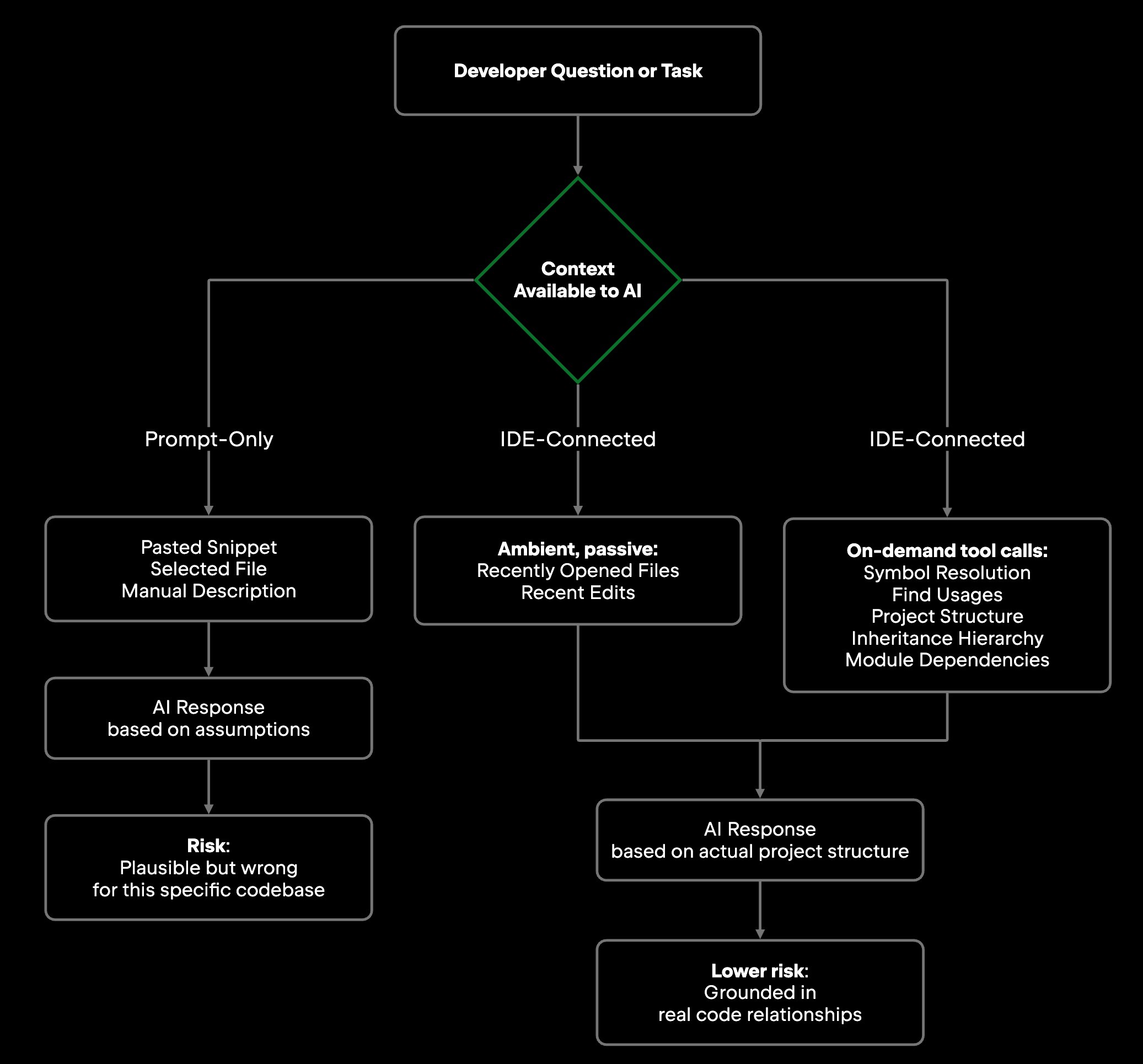
Concretely, an IDE-connected agent can ask for:
-
Symbols and their relationships: The agent resolves which UserService a reference points to, disambiguates overloaded methods, and reads what an interface requires of its implementations, instead of matching on text.
-
References and usages: The agent finds every place a function is called, every class that extends a base class, and every module that depends on a given service, the same lookups you would otherwise run by hand.
-
Project and file structure: The agent can pull directory layout, module boundaries, and build configuration to understand the project's overall shape rather than a handful of files.
-
Inheritance hierarchies: The agent walks class hierarchies to understand contracts, default behavior, and override chains instead of guessing them from one file.
-
Module dependencies: The agent can ask which packages depend on which, how bounded contexts relate, and where shared utilities sit in the architecture.
The agent calls for these when it judges them relevant, which is a design point rather than a limitation: pulling the entire project graph into context on every turn would bury the few relationships that bear on the task. What arrives without asking is narrower, and different in kind: recently opened files and recent edits, a recency signal that weights what is currently relevant rather than an inference about your intent.
In JetBrains IDEs, the AI Chat draws on this structure as you work. It can query the symbol index the IDE already maintains, which cuts down how often you need to attach files or describe your architecture by hand, so a question like "where does this service get its configuration?" or "what other classes implement this interface?" can be answered against the real project rather than a guess.
That same access is what makes multifile work dependable. A tool limited to one file can only vouch for that file; one connected to the IDE can verify a change against every call site in the reference graph before it lands.
How rich context improves common developer workflows
The benefit is clearest in the everyday work where missing context creates the most friction: getting oriented in unfamiliar code, working through legacy systems, tracing bugs across files, and refactoring without guessing at downstream impact. The common thread across all four is understanding rather than output: the agent earns its place by helping you understand how code you didn't write actually behaves.
Developers often underestimate how much work goes into understanding unfamiliar code. When you join a team or pick up a service you've never touched, the question isn't how to write the language; you already know that. The real questions are how the service works, who calls it, what invariants it assumes, and which edge cases you'll regret missing. Answering them from file browsing alone can take significantly longer than working with an agent that can trace the call graph, surface non-obvious dependencies, and explain what a class does in the context of the wider system.
Working with legacy code is harder still. The codebase has accumulated years of business logic, half of it undocumented and some of it contradicting the docs that do exist. What's safe to change isn't obvious. An agent with project-wide reference data can tell which functions are called from many places and which are used in only one, giving you a signal for where a change is contained and where it spreads. (See also: Using AI Agents to Work With Legacy Code More Efficiently)
Debugging complex issues usually means following execution across files and layers: the error starts in one file, passes through two more, and surfaces in a fourth. An agent that walks the call chain with the same reference data behind Find Usages reaches the root cause faster than one limited to what you pasted into a chat window.
Refactoring safely is where the context difference has the most concrete consequences. A change that looks safe in one file can break behavior in a module you never opened. An IDE-connected agent maps the full impact surface of a proposed change before you commit to it, querying the same reference graph the IDE's own refactoring tools use, so you see what the change touches up front.
Why IDE context matters for AI agent workflows
So far, the agent has mostly been answering questions and surfacing context. The stakes rise when it starts acting. An AI agent doesn't just respond and stop; it works in a loop, generating code, modifying files, running tests, and adjusting based on what it observes. A wrong answer is visible the moment you read it and costs you the next prompt. A wrong action can propagate across files before you review it, which is why what the agent understands about the project before it acts matters so much.
Asked to "add input validation to the user registration endpoint," an agent with only the prompt to go on may produce validation logic that's probably fine in isolation. It won't know that your project already has a ValidationUtils class of reusable validators, that your team throws a specific custom exception type, or that three other endpoints already handle this pattern in a way yours should match. An IDE-connected agent can surface all of that before it writes a line.
Junie, the coding agent from JetBrains, is the example to hold in mind: running inside a JetBrains IDE, it can call Find Usages on a symbol before changing one, resolve a reference against the index rather than guessing from the name, and check an override chain before touching a base class. ACP-compatible agents running in the IDE can be granted access to the same tool surface. The same agents, when run outside the IDE, do not have that IDE-backed project model available by default.
Dependency tracing is where this pays off. When an agent modifies a shared utility class, the full dependency graph changes the risk profile of the task: the agent can flag which callers are affected, which tests need updating, and which parts of the system warrant a closer look before any code changes are applied. The result is sharper judgment about which changes are safe to make.
Impact analysis works the same way. Renaming a field in a data model propagates through serialization code, API contracts, database migrations, and tests. An agent with IDE context can follow that propagation before it applies the change. Without it, it has to guess which downstream effects exist.
Richer context doesn't replace your judgment; it gives you better material to judge with. The agent assembles the relevant structure and surfaces it, and you still decide what to apply, especially for changes that touch many files at once. The advantage is accuracy: the agent acts on a real picture of the system instead of guessing at the parts it can't see.
Limitations and practical considerations
Structural access matters, but it has real limits: static analysis can't capture runtime behavior, large repositories need careful context scoping, and generated code still needs review.
The IDE's model of your project is structural. It knows where processPayment() is called. It doesn't know what happens at runtime when the payment gateway returns a 503 under load. Static analysis captures a great deal, but runtime behavior, such as feature flags evaluated at startup, configuration read from environment variables, and third-party responses under failure, lives outside the index. An agent working with IDE context can reason about structure; it can't fully reason about runtime state without observability data.
Large repositories bring their own challenge. A monorepo with millions of lines across hundreds of modules generates an enormous amount of context, and more isn't always better. The right context, scoped to the task, beats flooding the model with the entire project graph. In practice, that means pointing the agent at the module or package the work touches rather than the whole tree, so the structural signal stays relevant. How well a tool selects and prioritizes context matters as much as whether the tool has access to that context in the first place.
Generated code still needs review. IDE context lowers the rate of plausible-but-wrong suggestions; it doesn't eliminate them. The agent can see that a method is called in 47 places, but it can't always tell whether your behavioral change is correct for all 47 callers. That call is still yours. IDE-connected AI sees more of your project structure and therefore relies on fewer assumptions, but your review process still matters.
Final thoughts
An AI agent is only as useful as the context it can work with. That's a property of code intelligence itself: the more of your project an agent can query, the more of your actual problem it can address.
IDE-connected agents hold a structural advantage because they work inside the same environment as your code, on the index the IDE keeps for navigation and refactoring. That advantage grows with complexity: the harder a codebase is to hold in your head, the more the difference between querying the project's real structure and working from pasted code determines whether the agent produces a fix or a guess.
Repository understanding is fast becoming a baseline expectation for AI coding tools, and the tools that handle it well are the ones working closest to where you write code, rather than asking you to carry context to them by hand. For teams standardizing on tooling, and for the technical leaders evaluating it, one of the most useful questions is how the tool gets its context. If you spend your day in an IDE, that's the most direct place to see what richer context changes.
Frequently asked questions
How do IDE-connected AI agents differ from AI coding assistants that work in a chat window? IDE-connected agents can query the same structural index the IDE maintains, including symbol relationships, reference graphs, and inheritance chains, instead of working from code you paste by hand. They can trace dependencies, resolve ambiguous references, and reason about your project's overall shape, not just the snippet you shared. Tools limited to a chat window work from incomplete information; IDE-connected tools can answer against how your codebase is actually wired, and the same grounding helps whether the tool is answering a question or carrying out a task.
Why does incomplete context cause AI coding tools to produce wrong suggestions? A function often doesn't describe its own behavior completely. It calls other functions, implements contracts defined in interfaces, and depends on configuration loaded elsewhere. When an AI sees only the function, it infers the rest, and some inferences are wrong. A NullPointerException rooted in a Spring profile-specific configuration class, for instance, is invisible to any tool that only has the method where the exception surfaces.
What specific project data can an IDE-connected AI agent request? It can request data from the same project model the IDE relies on for everyday navigation: where each symbol is defined and used, what calls what, how types inherit from one another, and how modules depend on each other, along with build configuration and which files are currently active. If you have ever used Go to Implementation or a safe rename, you have already relied on that data; an IDE-connected agent reads the same model for a different job.
Does more context always make an IDE-connected AI agent more accurate? Not automatically. Past a point, more context dilutes the signal: handed an entire project graph, a model has to work harder to find the few relationships that actually bear on the task, and response quality can slip. What moves the needle is relevance, the structural data tied to the problem in front of you, rather than sheer volume.
Can IDE context help when working with legacy codebases? Yes, and it's one of the most valuable applications. Legacy code accumulates business logic that is often undocumented or at odds with the docs. An IDE-connected agent can tell which functions have many callers and which have few, a key signal for what's safe to change, and surface dependencies that would take hours to trace by hand.
What does IDE context not cover? IDE context is structural, not behavioral. It captures where code is defined and called, but not what happens at runtime. Feature flags evaluated at startup, environment-variable-driven configuration, and third-party behavior under failure all live outside the static model. An agent can reason about structure accurately; reasoning about runtime state needs observability data that the IDE index doesn't hold.
Is generated code from IDE-connected agents safe to use without review? No. IDE context lowers the rate of plausible-but-wrong suggestions by grounding the agent in real project structure, but it doesn't remove the need for review. Structural access tells the agent where code is used, not whether a particular change is the right one everywhere it lands, and that judgment stays with you. Review remains the developer's bar.